The way people search for information on the Internet is changing radically. Increasingly, users are not searching through traditional blue links, but asking artificial intelligence (AI) directly. This raises a whole new question for website owners: How do I know if the AI is drawing from my website to generate answers?
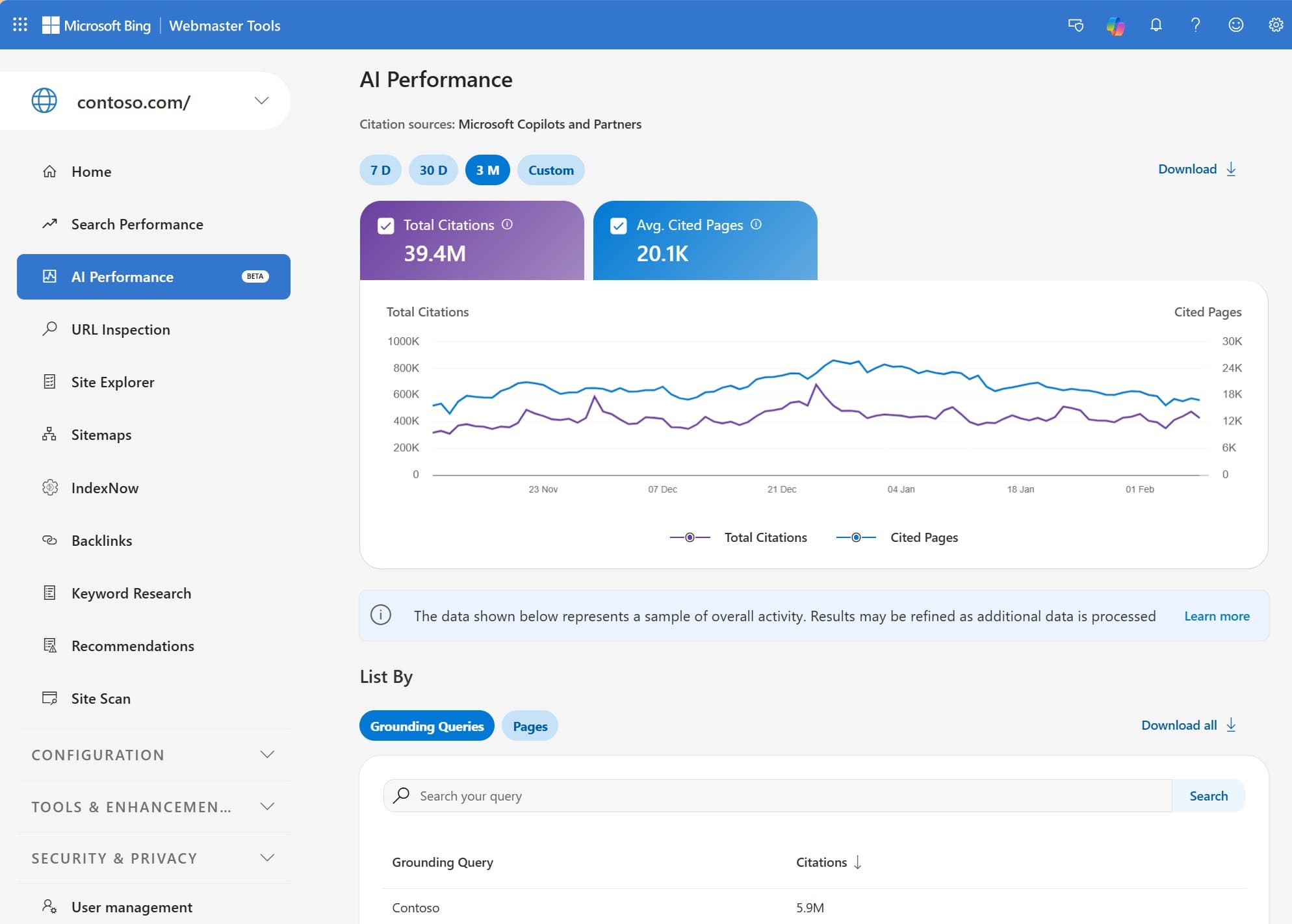
Until recently, it was a „black box“. But in February 2026, Microsoft launched a brand new tab within its Bing Webmaster Tools called AI Performance (in beta). It is the first ever official analytical tool from a major search engine that measures so-called GEO (Generative Engine Optimization) - i.e. optimization for generative search engines.
This report shows where and how often your content is cited in responses generated by the tool Microsoft Copilot, v AI summaries directly in Bing and at selected partners (he could also be ChatGPT, but it is not officially confirmed yet).
What does the new AI Performance tab actually measure?
Unlike traditional SEO reports that focus on keyword positions and click-throughs, AI Performance focuses on visibility and citation. The Dashboard contains five main metrics:
- Total citations: The absolute number of times your website was used as a source in an AI response over the selected period.
- Average cited pages: On average, how many unique URLs from your website does the AI use per day.
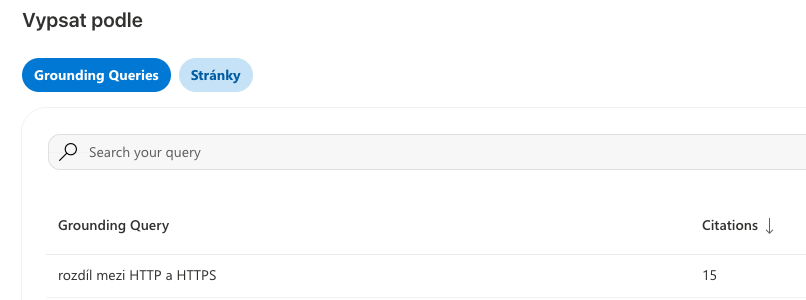
- Grounding queries: This is the most interesting metric. It's not the exact query that the user typed into the chat, but the key phrases that the AI itself has formulated, to find relevant information from your website in its database.
- Page-level citation activity: Overview of specific URLs and number of citations. This makes it easy to see which subpage is most attractive to AI.
- Visibility trends over time: A timeline showing whether your influence in AI responses is increasing or decreasing.
The crucial difference: citations do not equal traffic
When reading this data, it is critically important to understand one limitation: the report does not currently show click-through rates (CTR) or actual traffic.
The tool will tell you that Copilot read your page and used it to construct a response (quoted it), but it will not tell you whether a person actually clicked on the link in the sources and went to your site. So what is being measured here is authority and reach of your content, not a direct conversion. Still, it is indispensable data for future strategy.
4 practical steps: how to use report data for better visibility
Theory is one thing, but how to translate this information into a real advantage? Here are concrete steps on how to work with the new dashboard.
Step 1: Analyzing „Grounding queries“ to uncover content gaps
Look in the report for the phrases that the AI is searching for in your content. You'll often find that these are longer, conversational questions. If the AI is looking for answers to specific problems that you mention peripherally on the site but don't have a dedicated section for, it's time to expand your content. Real interest and strategy is not just to write texts for bots, but to create deep, guided answers to complex user questions. AI will immediately reward this approach with more frequent citations.
Step 2: Revise indexed but uncited pages
Compare data from traditional search with data from AI Performance. If you have a page on your site that has high organic traffic but the AI isn't citing it at all, it's probably structured wrong. Artificial intelligence loves clarity: clear headings (H2, H3), bullets, tables and FAQ sections. If your text is just a wall of words, the AI can't „chew“ it effectively and prefers to quote the competition. Also check your file llms.txt.
Step 3: Flash update via IndexNow protocol
AI systems need the most up-to-date data. If you modify a price list or add an important parameter to a product, you can't wait weeks for the search engine to figure it out. Use the protocol IndexNow. This automatically sends the content after each edit. Bingu a List (Google does not officially support it) signal that a change has occurred and request an immediate reindex. This is where the advantage of modern content management systems that provide users with flexibility and freedom update the site without waiting for the developer.
Step 4: Refine Local SEO via Bing Places
If you run a local business (e.g. a branch, restaurant or surgery), it's crucial for AI to know your exact details. Check your profile in Bing Places for Business. AI models primarily use these databases to answer queries like „where can I find...“. If your site has different hours than Bing Places, the AI answer will be confused and will prefer to recommend someone else.
Why does it make sense to deal with Bing when Google rules the market?
Many website owners ignore Bing, arguing that Google drives most of the traffic. But in the era of artificial intelligence, this is a dangerous mistake. Today, Microsoft's Copilot ecosystem is integrated into the Windows operating system, the Office suite and the Edge browser.
While Google does not currently offer a detailed AI citation breakdown in its Google Search Console and merges the data with regular searches, Bing makes accurate analytics available first. Moreover, most AI models are still very similar. Optimizing for Copilot will most likely bring you improved visibility and within ChatGPT, Gemini etc.
Optimization for AI (GEO) is a complex discipline and constantly monitoring these changes takes time. If you still don't know how to deal with it, talk to us unpaid consultation, we will be happy to help you.
Frequently Asked Questions (FAQs) about AI Performance in Bing webmaster tools
What exactly does „Grounding queries“ mean?
This is not the exact text that the user typed into the chat (the so-called prompt). It is an internal search phrase that the AI has created itself in the background to search the database for the information needed to build the final answer. This helps you understand what topics the AI associates your website with.
Why don't I see any data about clicks in the report?
Microsoft designed this dashboard primarily for measuring visibility (citation). In conversational AI models, the user often gets the answer directly in the chat and doesn't need to click anywhere. The report therefore measures your influence, not direct traffic.
Where can I find the AI Performance report?
You must have authenticated access to your site in the tool Bing Webmaster Tools. You will then find the AI Performance tab in the left side menu under the „Search Performance“ section. The tool is completely free.
Does Google offer similar data for its AI Overviews and Gemini models?
Currently (early 2026), Google does not offer a dedicated AI report with similar depth of data. Data from AI Overviews appears in Google Search Console, but is merged with regular search results, making it difficult to analyze accurately.
Google is moving in a similar direction. Starting in July 2026, Search Console will be able to measure how your posts on Instagram, TikTok, X, and YouTube are performing in search results. You can find more details in the article about Measuring Social Media in Search Console.
For your website to appear in AI responses at all, it must first be allowed in. In our article on [...], we explain which AI model bots website owners block most often today and why this can also harm traditional Google searches. AI Robots on the Web.
The AI's responses include websites that the models trust. The article explains how this works What is E-E-A-T?.