A company’s Instagram/YouTube account gets 50,000 views a month. Clear numbers, a nice graph, a good feeling. But how many of those people came because they found the post through Google? Until recently, no one knew.
Google has actually been displaying your social media posts in search results for quite some time. You can see them in images, videos, and the News section. However, only Google had access to that data.
That has changed. Search Console can now track Instagram, TikTok, X, and YouTube, and starting from July 29, 2026 This feature is available to everyone. We'll take a look at exactly what it shows, what it doesn't show, how to set it up, and what insights can be drawn from the data.
What Are Platform Services?
Platform properties are a new type of property in Google Search Console. In addition to the standard website property, you can also add a social media account and track how its content performs in search results.
Google feature announced on July 7, 2026 and at first he introduced it gradually. Three weeks later, July 29, he made it available to everyone and also published a guide on how to work with the data.
There are four supported platforms: Instagram, TikTok, X, and YouTube.
You'll see the data in three places: in standard Google Search, in the Discover feed, and in Google News. The last two will only appear in your reports if your content is actually driving traffic from them.
It's worth noting that you can use this feature even if you don't have a website. This means Search Console is no longer just a tool for website owners—it's now available to influencers as well.
What doesn't Google Search Console measure?
This is the most important sentence in the entire article, and it’s easy to overlook it in the excitement over the news.
Platform services only show how your content is performing in Google search results. They do not track how many times people have viewed it on the platform itself.
So, if 100,000 people see your TikTok video directly in the app, Search Console doesn't know about it. It's only interested in the portion of the audience that found you through search.
So this isn't meant to replace the analytics provided by individual networks. It's a supplement that answers a question that native statistics won't answer: How many people found our content through Google, and what exactly were they searching for?.
For smaller accounts, the numbers will likely be low. This isn't a measurement error—it's just the reality. And even so, it makes sense to track them, because they reveal something you can't find out elsewhere: what words brought people to your content.
How to Set Up the Platform Service Step by Step
The whole process takes just a few minutes, and you don't need a developer or to make any changes to your website. Before you begin, make sure you have your login credentials for your account on that network handy. Verification involves logging into your account and authorizing the connection, so you’ll need administrator privileges to do this.
1.Open Google Search Console Go to search.google.com/search-console and sign in with the Google account you want to use to manage the data.
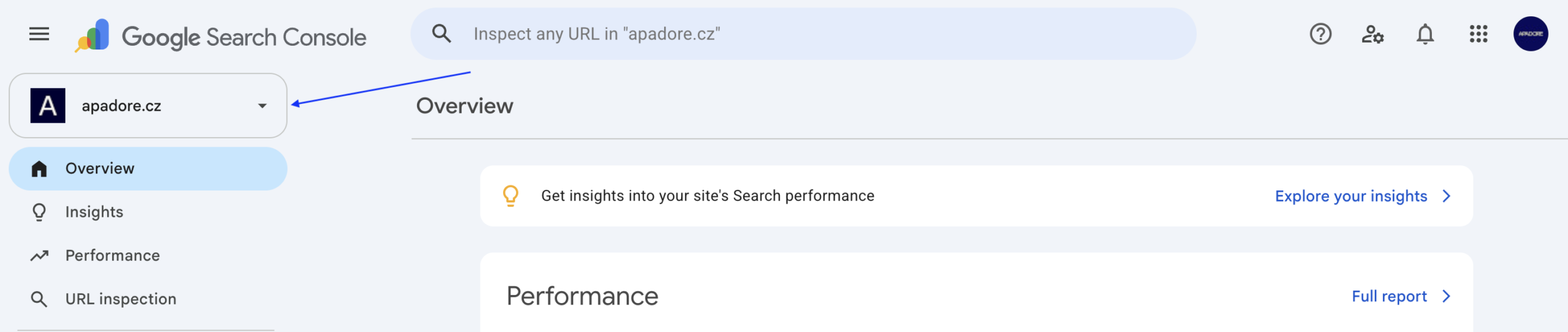
2.Initiate the addition of the service. Either select "Add a New Service" on the home screen, or anywhere in the interface, expand the list of services in the upper-left corner and click on Add a Service.
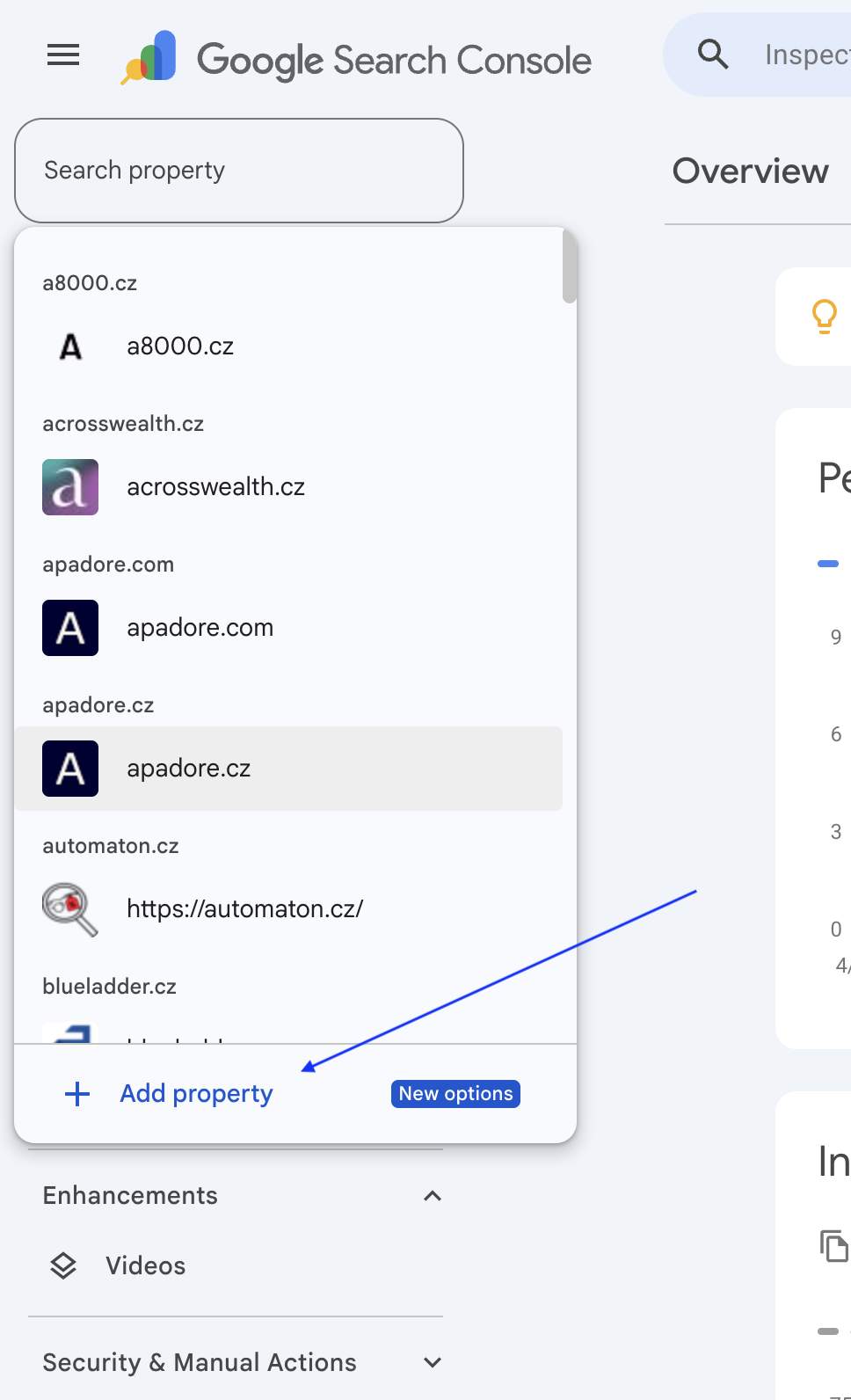
3.Select a platform. In the list of supported options, you'll see Instagram, TikTok, X, and YouTube. For the one you want to connect, click on Add.
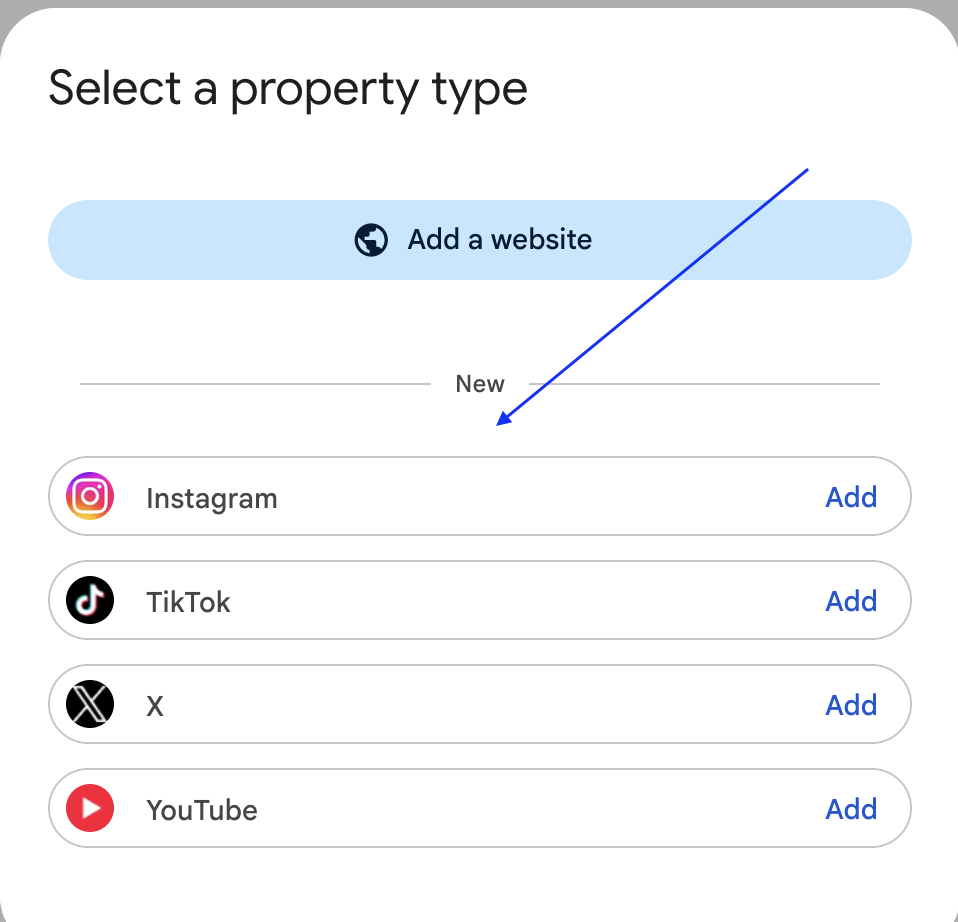
4. Complete the ownership verification process. Google will redirect you to the sign-in page for that network. There, you'll confirm that Search Console is allowed to access your account's performance data. You don't need to enter any code.
5. Complete the setup. After successful verification, a confirmation message will appear. Click Go to the service And you're done.
6. Repeat this for each account. Instagram, TikTok, and YouTube are three separate services. The same applies if you manage multiple profiles on a single platform.
Once you're done, you'll see the new service in the list next to your websites. You can switch between them just as you have been.
What to Do When Something Doesn't Seem Right
- The charts are empty. After setup, it takes a few days for the data to be collected and processed. For the first few days, you'll only see partial data for the period since the connection was established, not historical data.
- The platform is not listed. Please try again in a few days. The rollout has been phased in, and some accounts are experiencing a delay in accessing the new version of the interface.
- Verification failed. Make sure you're signed in with an account that has admin rights for the profile. This is often a stumbling block for business accounts, because access is frequently granted to someone other than the person who manages Search Console.
- You've set up a Search profile before. Then you should have the data for that platform available right away, without having to wait.
Three reports you'll receive
Performance
A familiar interface from web services. You'll see the total number of clicks and impressions, the average click-through rate, and the average search ranking.
Filtering is the most valuable feature. You can find out which specific posts drive the most traffic and for which search queries they appear. The data can be exported, so you can work with it even outside of Search Console.
Statistics
An overview of trends, top-performing content, and how people find you on Google. This is where you can see which search query groups are growing or, conversely, declining.
Achievements
Tracking milestones, such as reaching a certain number of clicks from search results over the past 28 days. It’s more of a motivational tool than an analytical one, but it’s useful for long-term content work.
The default period is set to 28 days for both Statistics and Performance.
Five Things You Can Do with Your Data Right Now
Along with the global launch, Google released an analytics guide. Here are the strategies from the guide that offer the fastest return on investment.
1. Find out what your audience is actually searching for on Google
In the Statistics overview, you'll find groups of search queries categorized as top-performing, rising, and declining. When you know that people are finding your video through a specific topic, you have a basis for your next video, for the description, and for choosing hashtags.
This is a major shift. Until now, when it came to social media, you’ve mainly been working with what works within each platform’s algorithm. Now you can also see the intent behind why people are coming to you from search results.
2. Spot a post that’s just started to gain traction
The "Last 24 Hours" filter will show sudden spikes in traffic from Google to recent posts. If you spot such content in time, you can promote it elsewhere right away: share it on other social media platforms, mention it in your newsletter, or write a follow-up post.
3. Compare the platforms side by side
Each platform is a separate service, so you can't compare them directly within the interface. However, you can export the data from them into a single spreadsheet and see which channel actually drives the most traffic to you from search.
That's the kind of information that can throw your budget off balance. Especially when you realize that the platform you're putting the most effort into is, from Google's perspective, the weakest one.
4. Revive older content that’s gaining traction again
Search Console can identify older videos or posts that have started to regain search traffic after several months. It’s worth pinning such content to your profile or turning it into a sequel.
It's the same logic you're familiar with from the web. Updating content that has already worked well is usually less expensive than creating new content.
5. Measure the impact of changes to headlines and captions
Search Console supports annotations. When you edit a video title on YouTube or a caption on TikTok, make a note of the date. After a few weeks, you'll be able to see from the graph whether it had an effect.
This turns the optimization of product descriptions into a measurable discipline rather than a matter of guesswork.
What to Watch Out For
Three things that will confuse you when you first look at the data.
- The numbers in the Statistics overview may not add up. The top summary tab counts all clicks from Google, including images, videos, and news. However, the lists below it focus only on regular search results. Therefore, the total from the tabs may be lower than the main figure. This is not an error; they are simply two different perspectives.
- The connection may be interrupted. Google regularly verifies ownership. When your network-side login expires, access to the service will be suspended until you re-establish the connection. However, your data will not be lost; once you've re-verified, you'll see the same reports.
- The new service won't show anything for a few days. Empty or incomplete graphs during the first few days are normal and do not indicate a malfunction.
What Does This Mean for Businesses?
At first glance, this may seem like a minor detail for content creators. In reality, it’s another step in the same direction that search has been moving in for some time now.
Visibility no longer stops at your website. People are looking for answers in AI summaries, on social media, and in videos, and Google serves them all together. By opening up social media data, Google is essentially confirming that it considers social media to be part of search.
For businesses, this leads to three practical conclusions:
- Captions and subtitles on social media are text that can be optimized. They're not just additions to the image. They determine which search queries your post will appear for.
- Social media and the web are no longer separate worlds. Measurement is now all under one roof, so the strategy should be a shared one as well.
- A new metric has been added that can be used to support the budget. Instead of debating whether it makes sense to make videos, you have the numbers showing how many people found them through search.
We described how to optimize for AI search in our article on GEO, AIO, and AEO. You can then track your results using Bing, which has started showing, which pages it cites in its AI responses.
Frequently Asked Questions
Which social media platforms does Search Console support?
Instagram, TikTok, X, and YouTube. Each account is added as a separate service, so if you have profiles on multiple networks, you'll need to repeat the process for each one.
Do I need my own website for this?
No. You can add the platform's service even if you don't have a website. With this move, Search Console is opening its doors for the first time to creators who publish exclusively on social media.
Does Search Console show how many people saw my Instagram post?
No. It measures only how well content performs in Google Search, the Discover feed, and Google News. It does not track views directly within the platform’s app; for those, continue to refer to the native analytics.
How long does it take for the data to appear?
A few days. It's normal for the charts to be empty right after setup. At first, you'll only see partial data for the days since the connection was established; the full picture will be filled in later.
When did this feature become available?
Google announced it on July 7, 2026, and rolled it out gradually. As of July 29, 2026, it is available globally to all Search Console users.
What happens if the connection is lost?
Access to the service will be suspended until you verify ownership again. However, your data will not be lost. Once the connection is restored, you'll see the same reports and won't have to wait for new data to be collected.
Can we compare the performance of Instagram and TikTok side by side?
Not directly within the interface, because each platform is a separate service. However, you can export data from each service into a single spreadsheet and compare it there.
Can anyone help me with the setup and evaluation?
You can set up the integration yourself in just a few minutes. But if you want to incorporate the data into your content strategy, get in touch with us. At Apadore, we handle visibility across all channels—from websites to search to AI-powered responses.
What to Take Away From This
Linking your accounts takes just a few minutes and doesn't cost anything. Even if your numbers are low, you'll learn something you didn't know before: what keywords are bringing people to your content on Google.
Don't expect a replacement for native statistics. Expect an answer to a different question: namely, what percentage of your audience comes to you from search, and what exactly they were searching for.
The most sensible first step is to link your accounts now and check the data in a month to see what it shows. Data collection only looks forward, so the sooner you start, the sooner you'll have data to work with.
Do you want people to find you across all channels, not just on the web? Contact us and we'll walk you through where you stand today and where you're falling short.
Can people see you? everywhere, where are they looking?
We'll build your website and content strategy so that Google can find you both on and off the web.
But Search Console isn't just for measuring social media reach. The same tool also displays Core Web Vitals—real-world data on website speed from actual users. We break down how to interpret this data and what to do with it in article on website speed optimization.
You know how to measure reach, but how can you increase it through trust? You'll find a practical overview of trust signals in the article What Is E-E-A-T and How to Build It.